Running LLMs in the Browser
Overview
A high-performance, private, and entirely local Large Language Model (LLM) chat application running directly in the browser using WebGPU and WebAssembly.
This project leverages the @mlc-ai/web-llm engine to execute the Llama-3.2-1B-Instruct model (default, other are available) on the client side, ensuring no data ever leaves your device.
Running LLM’s in the browser is desirable for a number of reasons:
- performance (no network involved, but you need decent hardware)
- privacy (no requests leave you machine)
- costs (don’t need to pay a 3rd party - it runs on your machine)
These are valid reasons but there are also drawbacks to the approach:
- performance is determined by the hardware in your machine
- its an immature approach, so can be tricky to setup and get working
- browser limitations
- software support to bring it all together
This post will look to address what is currently possible and will look to cover:
- Browser Issues
- Suitable libraries
- Limitations
- Storing chat sessions/history
Built with the assistance of Gemin CLI, which can go a little wonky from time to time, you need to keep an eye on what it decides to delete or auto commit for you !.
This is a brief overview and should be used in conjunction with the Demo video and GitHub Repo.
Code and Demo
GitHub repository is BrowserLLM
See the following video to see what it can do:
Technical Stack
- Framework: React 19 + TypeScript
- Build Tool: Vite 7
- AI Engine: @mlc-ai/web-llm
- Plugins:
vite-plugin-wasm,vite-plugin-top-level-await,dexie,react-markdown - Model: Llama-3.2-1B-Instruct (q4f32 variant), with others
Features
- Hardware Accelerated: Uses WebGPU for near-native inference speeds on supported hardware.
- Privacy First: 100% local execution; no API keys or server-side processing required.
- Optimized for Compatibility:
- Uses the q4f32 (32-bit float) model variant to bypass
shader-f16extension requirements (had issues on my hardware). - Implements a conservative KV Cache (maxNumPages: 32 to 128max) to support GPUs with strict workgroup limits (e.g., 256 max compute invocations).
- Uses the q4f32 (32-bit float) model variant to bypass
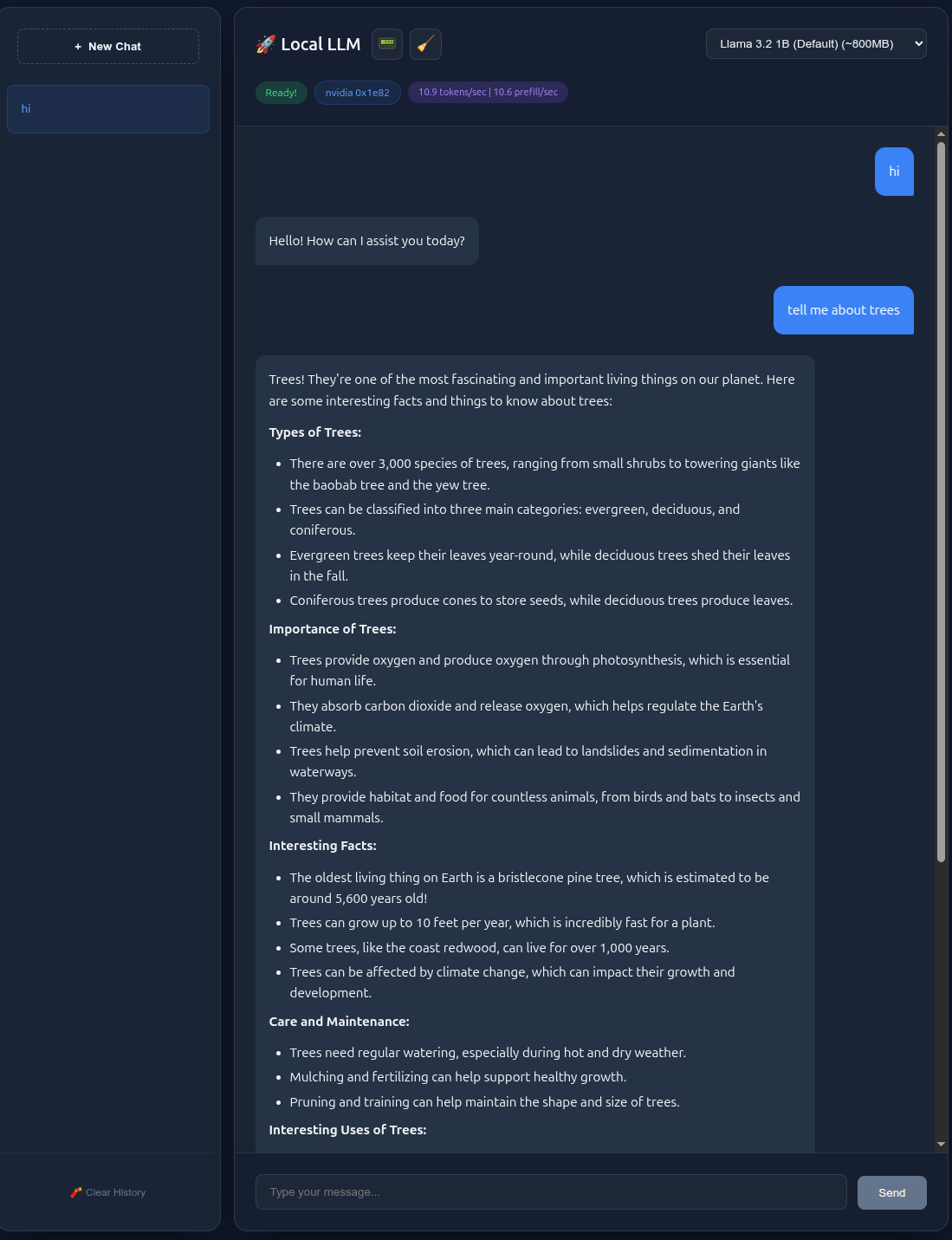
- Real-time Telemetry: Live display of Tokens Per Second (T/s) and Prefill Speed using the modern WebLLM usage metrics API.
- Modern UI: Glassmorphic dark-themed React interface with streaming responses and auto-scrolling chat history.
- Chat History: Create a new chat, rename and delete along with resume previous chat.
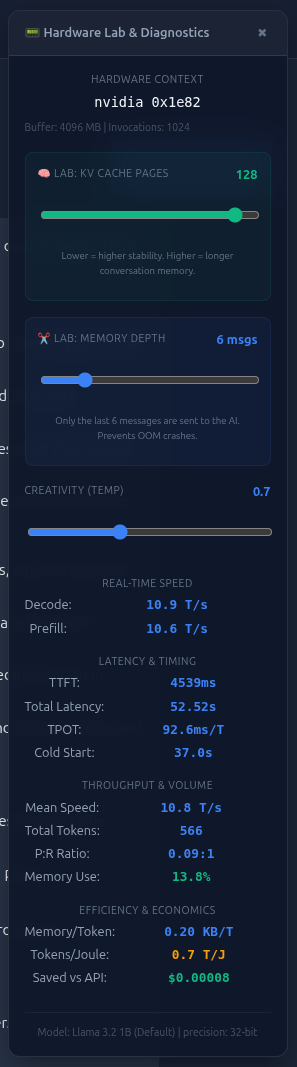
- Diagnostic Panel: displaying a number of metrics and settings e.g. variabke KV pages, memory depth, temperature, token decode and prefil, TTFT, total latency, TPOT, cold start time, mean speed, total tokens, P:R Ratio, Memory Use, Memory/Token, Tokens/Joule, Saved vs API estimate.
- ResetMemory: If you run out of memory you can reset memory to allow you to continue. You can do this any time with a button in the header but also another context sensitive button is displayed when a memory issue is detected.
- NVIDIA Icon: Is displayed when everthing is wired corerctly and you graphics card is detected, displays google otherwise. Sorry, but not able to test on other hardware.
The app was built on Ubuntu 24.04 and tested using Chrome Version 145.0.7632.159, your mileage may vary if you test on Mac or Windows. Would love you know how you get on.
Example screen shots
If you don’t have the time to watch the video, this is what it looks like.
Linux GPU Requirements
WebGPU on Linux requires a healthy Vulkan environment. Ensure your system meets these prerequisites:
- Drivers: Use the proprietary NVIDIA or AMD drivers (open-source Mesa drivers work but may require specific browser flags).
- Vulkan Loader: Ensure the Vulkan loader is installed:
1
sudo apt install libvulkan1 mesa-vulkan-drivers
- Verification: Confirm Vulkan is active by running:
1
vulkaninfo --summary
If this command fails, WebGPU will not be able to access your hardware acceleration.
Install and Run
- Clone the repository and navigate to the project folder:
1
npm install - Start the development server:
1
npm run dev
Note: There are also tests (npm run test) and linting (npm run lint)
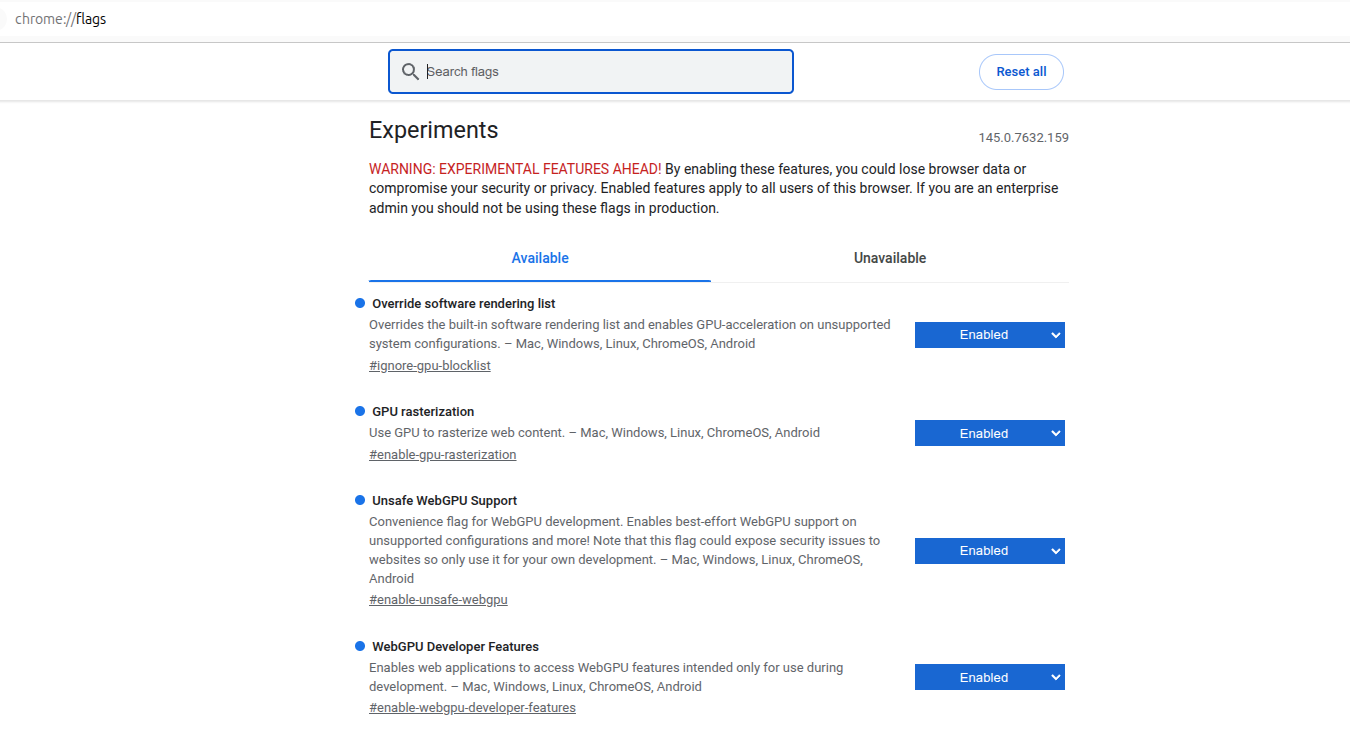
Due to strict shader validation in certain Linux/Mesa drivers, it is recommended to launch Chrome with specific flags to ensure smooth shader compilation:
1
2
3
4
google-chrome --user-data-dir=/tmp/chrome-test \
              --enable-dawn-features=allow_unsafe_apis \
              --enable-webgpu-developer-features \
              http://localhost:5173
--user-data-dir: Uses a fresh profile to avoid corrupted GPU shader caches (this was more an issue during development, not once it runs)--enable-dawn-features=allow_unsafe_apis: Bypasses strict WGSL shader validation that can cause hangs during the compilation of complex LLM kernel--enable-webgpu-developer-features: required for development, don’t use in a production environment. See here
When the app runs, a number of debug messages are display to track progress. Here we are restoring a previous session and loading Llama-3.2-1B
1
2
3
4
5
6
7
8
9
10
11
12
13
14
15
16
17
[Session] Restoring last active session: 4
[Engine] Initializing model: Llama-3.2-1B-Instruct-q4f32_1-MLC
[Hardware] WebGPU Adapter Limits: {maxBufferSize: '4096 MB', maxComputeInvocationsPerWorkgroup: 1024}
[Engine] Initializing model: Llama-3.2-1B-Instruct-q4f32_1-MLC
[Engine] Init Progress: Start to fetch params
[Engine] Init Progress: Loading model from cache[1/22]: 126MB loaded. 18% completed, 3 secs elapsed.
[Engine] Init Progress: Loading model from cache[1/22]: 126MB loaded. 18% completed, 2 secs elapsed.
[Engine] Init Progress: Loading model from cache[2/22]: 142MB loaded. 21% completed, 3 secs elapsed.
...
[Engine] Init Progress: Loading model from cache[20/22]: 623MB loaded. 93% completed, 7 secs elapsed.
[Engine] Init Progress: Loading model from cache[21/22]: 639MB loaded. 96% completed, 7 secs elapsed.
[Engine] Init Progress: Loading model from cache[22/22]: 664MB loaded. 100% completed, 8 secs elapsed.
[Engine] Init Progress: Loading GPU shader modules[86/87]: 98% completed, 2 secs elapsed.
[Engine] Init Progress: Loading GPU shader modules[87/87]: 100% completed, 2 secs elapsed.
[Engine] Init Progress: Finish loading on WebGPU - NVIDIA GeForce RTX 2080
[Engine] Init Progress: Loading GPU shader modules[87/87]: 100% completed, 1 secs elapsed.
[Engine] Init Progress: Finish loading on WebGPU - NVIDIA GeForce RTX 2080
Google Chrome Flags
To ensure optimal performance and compatibility on Linux, verify your chrome://flags settings. Below is a reference for the recommended GPU and Dawn API configuration:
Performance Notes
- Initial Load: The first run will download several hundred megabytes of model shards and cache them in your browser’s persistent storage (Origin Private File System). Subsequent loads will be much faster.
- Hardware Limits: This app is pre-configured for devices with a
maxComputeInvocationsPerWorkgrouplimit of 256. If your hardware is more powerful, you can increasemaxNumPagesinApp.tsxfor better performance on longer conversations.
Models supported
Decided to go with models that run within 4GB limit, the following is output when the app runs, so you will see if you’re the same.
1
2
3
4
[Hardware] WebGPU Adapter Limits: {
    "maxBufferSize": "4096 MB",
    "maxComputeInvocationsPerWorkgroup": 1024
}
This is the limit for my machine and browser, your mileage may vary.
1
2
3
4
5
6
7
8
9
10
11
12
13
14
15
16
17
18
19
20
21
22
23
24
25
26
27
28
29
30
31
32
33
34
35
36
37
38
39
40
41
42
43
44
45
46
47
48
49
50
51
52
53
54
55
56
57

/**
 * NOTE The Model Registry.
 * In a local AI app, choosing the right quantization and float-precision
 * is the difference between a working app and a browser crash.
 */
export interface ModelRecord {
  id: string;
  name: string;
  description: string;
  vram: string;
}

export const SUPPORTED_MODELS: ModelRecord[] = [
  /**
   * Llama 3.2 1B (q4f32):
   * NOTE: We use q4f32 (4-bit weights, 32-bit floats) because
   * many Linux drivers (Mesa) do not yet allow 'shader-f16' (16-bit floats)
   * by default. f32 is the most compatible choice.
   */
  {
    id: "Llama-3.2-1B-Instruct-q4f32_1-MLC",
    name: "Llama 3.2 1B (Default)",
    description: "High quality instructions, balanced performance.",
    vram: "~800MB"
  },
  {
    id: "Llama-3.2-3B-Instruct-q4f32_1-MLC",
    name: "Llama 3.2 3B (Pro)",
    description: "🚀 High-intelligence; best for complex reasoning.",
    vram: "~2.5GB"
  },
  {
    id: "Qwen2.5-0.5B-Instruct-q4f32_1-MLC",
    name: "Qwen 2.5 0.5B",
    description: "Extremely fast, great for simple tasks.",
    vram: "~350MB"
  },
  {
    id: "SmolLM2-135M-Instruct-q0f32-MLC",
    name: "SmolLM2 135M",
    description: "Ultra-lightweight, minimal resource usage.",
    vram: "~100MB"
  },
  /**
   * Compact Context (1k):
   * NOTE: LLM memory usage is defined by Weights + KV Cache.
   * By using a '1k Context' model, we artificially limit the 'memory'
   * of the model to save huge amounts of VRAM.
   */
  {
    id: "Phi-3.5-mini-instruct-q4f32_1-MLC-1k",
    name: "Phi 3.5 Mini (1k Context)",
    description: "🚀 High-intelligence with optimized memory; best for logic.",
    vram: "~3.2GB"
  }
];
The vram is approximate, you also need to consider the key/value cache and also the memory you are trying to maintain, so space above what is mentioned just for the LLM.
I found SmolLM2 to be very basic, Phi-3.5 to hallucinate and go off topic really quickly. Llama-3.2 (set as Default) though is great and seems to be the sweat spot, especially 1B. This is seems to provide a great balance of performance and knowledge.
Sending a Query
The handleSend function in App.tsx is the main function that controls processing, taking the input, passing to the LLM and then processing the output. The sending process is as follows:
1
2
3
4
5
6
7
8
9
10
11
12
13
14
15
      const slicedMessages = messages.slice(-contextSlicing).map(m => ({
        role: m.role,
        content: m.content
      } as webllm.ChatCompletionMessageParam));

      const chunks = await engine.chat.completions.create({
        messages: [
          ...slicedMessages,
          { role: 'user', content: content }
        ],
        temperature: temperature,
        stream: true,
        stream_options: { include_usage: true }
      });
Here we slice the stored (i.e. previous) messages, so we keep some memory as context to pass in with the new query. engine.chat.completions.create is the function that passes the query to the LLM, along with temperature etc.
Getting a Response
The response from the LLM is streamed one work at a time, so we take the word and build up the respsone details, displaying on the screen as we go. Additionally the response is stored in the local IndexDB database.
1
2
3
4
5
6
7
8
      for await (const chunk of chunks) {
        const delta = chunk.choices[0]?.delta?.content || "";
        fullResponse += delta;

        const finishReason = chunk.choices[0]?.finish_reason;
        if (finishReason === "length") {
          setError("Generation cut off: Model context window is full.");
        }
In the snippet above, we get the delta i.e. the new change and append it to fullResponse to erm build up the full reponse. We also check to see if the model context is full, displaying an error if it is. This is demo’d in the video.
Overall
Pros
- The process works remarkably well, for what it is
- results vary based on the model Llama 3.2 1B works
- this will only get better, SLM and LLM’s on dives is the route
- its private, no network traffic sent when you type a query
- its cheap, no fees to pay
- can help you understand how LLM’s work and how to play with them
Cons
- limited by memory
- speed depends on your hardware
- can take a bit to setup
- only tested on Ubuntu 24.04 with Nvidia RTX 2080 8GB.
- Can error at any point due to memory issues